IP Address Explained: A Simple Guide for Real Life
An IP Address is the internet’s delivery label. It helps data reach the right device, whether that device is a phone on Wi-Fi, a laptop on Ethernet, a smart TV, a game console, or a printer sitting on a home network. Without an IP Address, apps would not know where to send messages, websites would not know where to return pages, and streaming would not know where to deliver video.
This guide keeps the explanation simple, but it still covers the details that matter in everyday troubleshooting, privacy decisions, and basic network security. It also answers common searches like Whats my IP address, IP address location, Show my IP address, and IP address check, in a way that stays useful for beginners and still accurate for advanced readers.
What an IP Address is and why it exists
An IP Address is a numeric identifier used by the Internet Protocol. That is the IP address full form in plain terms: Internet Protocol Address. The purpose is routing. Networks need a way to decide where traffic should go next, and IP addressing is the system that makes that possible.
In real life, people rarely need to “be a networking expert” to understand an IP Address. It is enough to know that an IP Address is the label that lets devices send and receive information across a network.
IP address example that makes the idea concrete
An IPv4 IP Address example looks like 192.168.1.23. This format uses four number groups separated by dots.
An IPv6 address is longer and can look like fe80::f3b1:2aa:ff:fe00:1. IPv6 uses hexadecimal characters and colons to support far more unique addresses.
What an IP Address does behind the scenes
When a device requests a webpage or connects to a game server, the request travels through routers. Each router reads the destination IP Address and forwards the traffic closer to the destination. The return traffic comes back using the source IP Address as part of the reply path.
That basic “send here, return there” logic is why IP Address fundamentals show up everywhere in troubleshooting, security logs, and internet access controls.
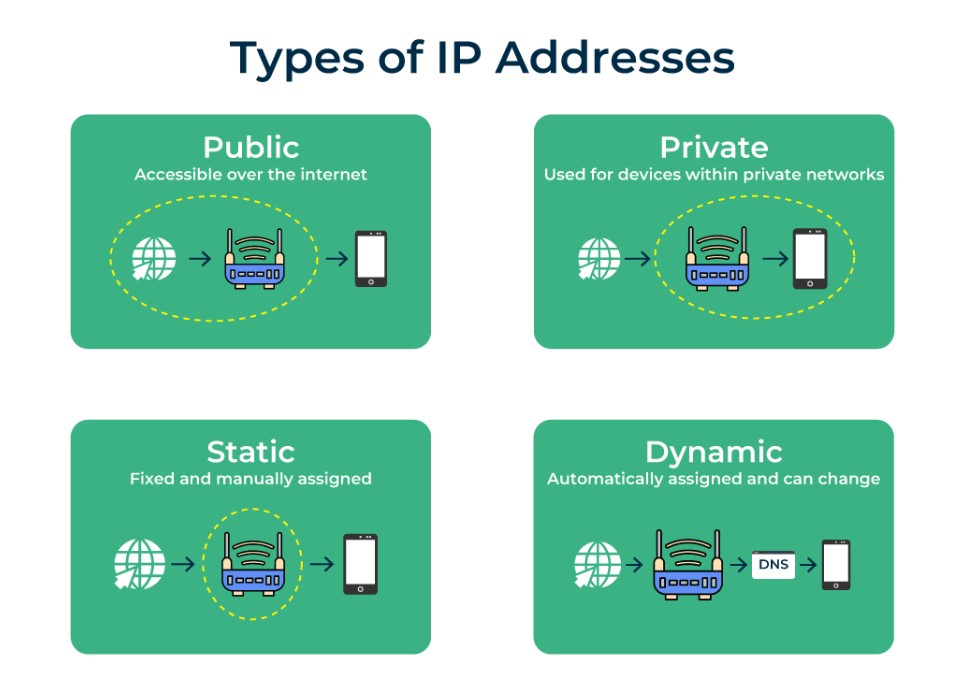
Public and private IP addresses
Many people assume there is only one IP Address per device, but most devices actually live in two worlds: the private home network and the public internet.
A typical home network uses a router to connect many devices to one internet connection. The router assigns private addresses inside the home, while the internet side uses a public address.
Public IP address provided by ISP
A public IP Address is the address that websites and internet services can see. It is usually assigned by the ISP. This is the address behind common searches like What is my IP address Google, Whats my IP address, and Show my IP address.
Most households have one public IP Address shared across many devices, because the router uses NAT (Network Address Translation) to manage traffic between private devices and the public internet.
Private IP addresses inside the home
A private IP Address is used only inside a local network. These addresses commonly appear as 192.168.x.x, 10.x.x.x, or 172.16.x.x to 172.31.x.x. That last range is why searches such as 172 ip address appear often when someone is checking a local device’s settings.
Private addresses are not directly reachable from the open internet in normal home setups. They are meant for local routing between devices and the router.
Automatic Private IP Addressing and the 169.254 range
Sometimes a device shows a 169 ip address or 169.254 ip address. This often points to Automatic Private IP Addressing (APIPA). It usually means the device could not get an address from the DHCP server, so it assigned itself a temporary local address.
When 169.254.x.x appears, the device may talk to itself or to some nearby devices, but internet access is often broken until DHCP works again.
IPv4 vs IPv6 in plain language
Most people do not need to choose between IPv4 and IPv6, because operating systems and routers handle it automatically. Still, the difference matters when troubleshooting or reading network settings.
IPv4 is older and shorter. IPv6 is newer, longer, and built for the scale of modern internet usage.
What is my IP address IPv4 and why it still dominates
IPv4 is the version most people recognize. It is still widely used, mainly because the global internet has run on it for decades and many systems were built around it.
An IPv4 address is made of four numbers from 0 to 255. The pool of available IPv4 addresses is limited, which is one reason IPv6 was created.
Sample IPv6 IP address and what it changes
A sample IPv6 IP address looks like 2001:db8::8a2e:370:7334. IPv6 supports a massive address space, which matters for mobile devices, smart home devices, and large cloud systems.
Many devices also show a link-local IPv6 address starting with fe80::. Link-local addresses work inside the local network segment and are common even when public IPv6 is not in use.
CIDR, ranges, and why “classes” still show up in searches
Older learning resources mention IP address classes range, but modern networks often describe ranges using CIDR IP address notation, such as 192.168.1.0/24.
CIDR matters for network planning, firewall rules, and IP address calculators. It is also why searches like ip address calculator and cidr ip address appear when someone is dealing with subnet masks, routing, or address allocation.
How a device gets an IP Address
Most devices do not require manual configuration. They get an IP Address automatically, typically from DHCP, along with the default gateway (router address) and DNS servers.
The “automatic” behavior is great for convenience, but it also creates common confusion when something changes or stops working.
Does an IP Address change
Many people ask does ip address change or does your ip address change. In most home setups, the answer is yes.
A local private IP Address can change when the device reconnects or when the router’s DHCP lease assignment shifts. A public IP Address can also change, depending on ISP policies and service type. Some ISPs rotate addresses periodically, and some keep them stable for long periods.
Releasing and renewing IP Address details
Troubleshooting often includes releasing and renewing ip address or release and renew ip address actions. This forces the device to request fresh network settings from DHCP.
If a device is stuck with a broken configuration, renewing can restore correct routing and DNS settings without deeper changes.
When a static IP Address makes sense
Static IP addresses are not necessary for most devices, but they help when something must stay easy to find. Printers, network storage, and some smart home hubs benefit from stable local addressing.
A stable setup can come from a true static configuration or from DHCP reservations in the router. The outcome is the same: the device consistently appears at the same local IP Address.
How to find an IP Address on common devices
People usually want one of two things: the public IP Address visible to the internet, or the local IP Address used inside the network. These are different values, and that difference prevents a lot of confusion.
Whats my IP address and Show my IP address in a browser
When someone searches Whats my IP address, the result usually shows the public IP Address, not the device’s local private address.
Many search engines display a simple “what is my IP” panel, which is why the phrase What is my IP address Google appears so often. These results are convenient for quick IP address check tasks, especially when diagnosing access blocks or location-based services.
Finding a local IP Address on Windows, Mac, and Linux
On Windows, a person can open Command Prompt and run ipconfig to see the IPv4 and IPv6 information. ipconfig /all provides deeper detail like DNS servers, the default gateway, and whether DHCP is enabled.
On macOS, a person can use System Settings network details or Terminal commands such as ifconfig. This is a common reason for searches like how to find an ip address mac, how to check ip address on mac, and find ip address on mac.
On Linux, the ip addr command is widely used, and tools like traceroute help map the path traffic takes. Some people also search for ways to find “exact location” from an IP, including phrases like ksli linux find exact location of ip address. That expectation is usually unrealistic, and the location topic is covered later in this guide.
How to find my router IP Address
The router’s IP Address is usually the default gateway. That is why searches like how to find my router ip address, how to find router ip address, and how do i find my router’s ip address tend to appear alongside connectivity issues.
Most devices display the default gateway in their network settings. The value is often something like 192.168.0.1 or 192.168.1.1, but the exact value depends on router configuration. Brand-specific searches such as xfinity router ip address, comcast router ip address, and comcast ip address are common because many people want the default gateway to sign in and manage Wi-Fi settings.
How to find printer IP Address, including HP printers
Printer connectivity problems often come down to the printer’s local address. That drives searches like how to find printer ip address, how to check printer ip address, and hp printer ip address.
Many printers show the IP Address on the printer screen, in the network menu, or on a printed configuration page. That is why phrases like how to print ip address of printer and where to find ip address on printer show up frequently. Once the printer IP Address is known, it becomes easier to add it to a computer, update drivers, or fix “printer not found” errors.
Where to find Roku IP Address
Streaming devices sometimes need a local IP Address for network troubleshooting and router settings. That explains searches like roku ip address, how do i find ip address for roku, and where to find roku ip address.
Most Roku devices display network details inside Settings, usually under Network or About. The value is typically a local IP Address used within the home network.
How to change IP Address on iPhone or Android
People often search how to change ip address on iphone and how to change ip address on android. In most cases, the practical “change” happens by switching networks, reconnecting to Wi-Fi, renewing DHCP, or changing router settings.
A public IP Address change depends more on the ISP connection than the phone itself. A local IP Address change often happens automatically when reconnecting to Wi-Fi or renewing the lease.
IP address location and what it really reveals
IP address location tools can be useful, but they are frequently misunderstood. An IP Address is not a GPS coordinate. It usually indicates an ISP and a broad region, not a street-level location.
That distinction matters for privacy expectations and for diagnosing problems like wrong content region, suspicious logins, or misidentified locations.
Why IP location is often approximate
IP geolocation databases map address blocks to regions based on ISP registrations, routing data, and observed traffic patterns. The result can be accurate at the country level and sometimes at a city level, but it is not guaranteed. Mobile networks, corporate networks, and VPN services can make it less precise.
That is why someone can see a location that looks “wrong” while the connection still works normally.
When “exact location from IP” claims are misleading
Many guides imply that an IP Address reveals an exact home address. That is rarely true from a standard lookup. Exact identification usually requires cooperation from the ISP, access logs, and legal processes, not a public lookup tool.
For everyday users, the practical takeaway is simple: IP address location is a rough clue, not a precise map pin.
What can someone do with an IP Address
The question what can someone do with your ip address comes up because people want clear risk assessment without fear-driven exaggeration. A realistic answer builds confidence and helps users choose sensible protection.
An IP Address can reveal an approximate region and ISP. It can also be used for scanning, targeted abuse attempts, or rate-limited attacks. It typically cannot reveal a person’s name, exact home address, or private files by itself.
Common real-world risks
IP-based risks most often involve nuisance-level problems. That includes repeated login attempts, service blocking, or unwanted traffic. More serious issues typically require additional weaknesses, like exposed ports, outdated routers, weak passwords, or misconfigured firewall rules.
The strongest protection usually comes from basic network hygiene: secure router settings, updated firmware, strong Wi-Fi credentials, and sensible account security.
How to hide an IP Address in a practical way
Searches like how do i hide my ip address usually reflect a privacy goal: reducing tracking, protecting activity on public Wi-Fi, or avoiding location-based restrictions.
The most common options include VPN services, proxies, and Tor. Each tool changes what the internet sees, but each has trade-offs in speed, reliability, and trust.
Does VPN change IP Address
Does vpn change ip address is one of the most direct questions in this space. In most cases, yes. A VPN routes traffic through a VPN server, so websites see the server’s IP Address instead of the original public IP Address.
This helps with privacy on shared networks and can help with region-based access, but it does not erase identity if someone signs into the same personal accounts across sessions. Privacy tools protect traffic routes, not personal decisions.
IP Address troubleshooting that actually solves problems
Many internet problems look mysterious until an IP Address check reveals what is wrong. Issues like “no internet,” login failures, or devices disappearing from a network often come down to routing, DNS, or a broken lease.
How to ping an IP Address and what it proves
Pinging is a simple test that checks whether a device can reach another IP Address. That is why searches like how to ping an ip address and how do i ping ip address appear so often.
A successful ping suggests basic network reachability. A failed ping does not always mean the destination is down, because some systems block ping requests, but it still offers a useful signal during troubleshooting.
“Server IP address could not be found” and what it usually means
Errors like server ip address could not be found often point to DNS problems rather than internet outages. If DNS cannot translate a domain name into an IP Address, the browser cannot connect even if the network is working.
A reliable fix is often checking DNS settings, rebooting the router, renewing the IP configuration, or testing with another network. When DNS is the issue, visiting an IP Address directly might work while the domain name fails.
Printer and device issues that trace back to IP settings
Printer problems are frequently caused by IP changes. A printer IP Address can shift after a reboot, especially if the router assigns a new address. That creates disconnects where a computer still tries to reach the old address.
This is why stable printer configuration, DHCP reservations, and checking the printer’s network status page can save hours of frustration.
MAC address vs IP Address
People also search mac address vs ip address and ip address vs mac address because both values appear in network settings. They serve different roles.
A MAC address is a hardware identifier used within the local network segment. An IP Address is a routing identifier used across networks. MAC addresses help local delivery on a LAN, while IP addresses help traffic move between networks and across the internet.
Email headers and “how to check email IP Address”
Some users search how to check email ip address because they want to identify where a message came from. Email headers can show sending servers and relay paths, but they often do not show the sender’s real home IP Address, especially for webmail services that protect privacy.
When examining email headers, the safest approach is focusing on the sending domain authentication (like SPF and DKIM results) and the mail server chain, rather than assuming an IP Address directly identifies a person.
Tools people search for: calculators, APIs, and random IPs
Some IP-related searches are more technical, but they still matter for IT tasks, development, and automation.
IP address calculator and CIDR planning
An ip address calculator helps translate CIDR notation into usable ranges, host counts, and subnet masks. This is useful when planning networks, setting firewall rules, or validating whether a range overlaps with another.
This topic also connects to ip address classes range searches, because many people learn the older “class A, B, C” model first and then later meet CIDR in modern documentation.
IP address application programming interface and geolocation services
An ip address application programming interface is commonly used to detect approximate location, identify ISP, estimate risk scoring, or adjust content based on region. Many businesses rely on IP-based signals for fraud prevention and localization.
IP-based APIs should be treated as probabilistic tools. They can guide decisions, but they should not be treated as identity proof. For privacy-sensitive products, clear disclosures and respectful data handling matter.
Random IP address and randomizer searches
People sometimes look for random ip address, ip address random, ip address randomizer, or ip address randomiser for testing and development. Random values can be useful in documentation, simulation, and training, but real network testing should avoid hitting addresses that belong to unrelated organizations.
For safe examples, reserved documentation ranges are often used in technical writing so nothing accidentally targets a real system.
Conclusion
An IP Address is not mysterious, and it is not only for command-line experts. It is the routing label that helps devices send and receive data. Once the difference between public and private addresses is clear, common tasks become simpler: IP address check actions make sense, printer connection issues become easier to solve, router access becomes less confusing, and privacy choices like does vpn change ip address become straightforward to evaluate.
For readers who want stronger privacy or fewer access issues, the next best step is choosing the right tool for the goal, then keeping the setup stable. A reliable network usually comes from clarity, not complexity.